

⌚ Time to read – 4 minutes
So you got a new car and want to protect it.
That feeling is hard to beat. It’s the kind of purchase that makes you walk a little slower when you park—just to look back at it one more time. I know that feeling.
I also know the other one.
It wasn’t a car, but I did have my motorcycle stolen. Never recovered. No dramatic chase, no “it showed up two streets away.” Just gone. And you don’t forget that lesson: it’s not the value of the vehicle that hurts most — it’s the helplessness.
That’s why I’m going to start this guide with a truth that most “Top 10 GPS Trackers” articles won’t tell you:
Most trackers are fine. The difference between “recovered” and “gone forever” is usually not the model — it’s the setup.
Because theft isn’t random chaos. It’s a process. And once you understand that process, you stop shopping for “the best tracker” and start building something much more useful: protection from multiple fronts.
If that sounds dramatic, keep reading. It’ll make sense in five minutes.
Before Trackers: One Connectivity Mistake That Ages Your Purchase Overnight
Quick heads-up: a lot of GPS trackers still run on 2G. Not because they’re “cheap,” but because 2G has been the standard for years and a tracker doesn’t need much data to do its job.
The issue is the 2G sunset is already in motion—and it’s not a one-day switch. Even before the final shutdown date, networks get refarmed and coverage can slowly get worse.
That’s why we lean toward 4G/LTE trackers in our store. Not because it’s fancy—because you don’t want your protection aging out.
How Cars Get Stolen (And Why One gps Tracker for your car Is a Weak Plan)
People imagine theft like a movie: someone breaks in, crosses wires, drives off. That still happens sometimes with older vehicles, but it’s far from the whole story.
Newer cars often get taken through faster, cleaner methods: keyless/radio tricks, diagnostic access, or simply moving the car to a quiet location where the real work happens next.
And here’s the part most owners don’t think about:
The theft is often not “the event.” It’s the first step.
A lot of cars get moved quickly to a calmer place first. Then the thief has time. And when they have time, they do what you would do if you were them: they look for trackers.
Not necessarily during the theft itself — later. So your tracker needs to survive the second act, not just the first.
That’s why an OBD tracker can still be valuable while also being vulnerable. Not because it will be ripped out immediately in the driveway, but because it might be discovered in a later search.
Which brings us to the only approach that consistently holds up:
Layered protection.
The Layered Setup: What Actually Improves Recovery Odds: our top auto tracking devices for cars
Think of this like security in real life. You don’t secure a house with only one lock. You create friction, uncertainty, and redundancy.
Same with a vehicle.
Below are five layers. You don’t necessarily need all five. But you should understand what each layer is doing — and what problem it solves.
Layer 1: The “Instant Install” Tracker (OBD Plug & Play)
If you want something you can install in minutes without tools, the OBD approach is still the fastest path to “I have tracking today.”
Our pick for that job is the Teltonika FMC003 OBD2 tracker:
https://kiloelectronics.com/en/produkt/teltonika-fmc003-4g-car-tracker-obd/

The obvious benefit is simple: plug it in and it starts doing its job. But the underrated value is what most reviews never talk about: an OBD tracker doesn’t only report location. It can also provide useful vehicle stats (depending on the vehicle) — the kind of information that helps you understand how the car is used, keep an eye on behavior, and simply know your vehicle better.
Now the honest part.
An OBD tracker lives in a known location. The port isn’t a secret. A thief may not touch it during the theft, but later — when they’re calm, indoors, and searching — it’s one of the places that gets checked.
So the right way to think about an OBD tracker is this:
It’s a strong first layer. It should not be your last layer.
Layer 2: The Hidden Primary Tracker (Hardwired, Not Obvious)
This is where the “best tracker” conversation gets real.
If you hide a tracker properly and power it properly, you stop playing the plug-and-play game entirely. You’re no longer relying on the first place someone checks.
A great option for this layer is the Teltonika FMC920:
https://kiloelectronics.com/en/produkt/teltonika-fmc920-gps-tracker-en/

This is the type of tracker you place where it doesn’t scream “I’m a tracker.” Behind trim, deeper in the dash area, in places that are annoying to access quickly. Done right, it becomes the device that stays with the vehicle while the obvious stuff gets removed.
This is also the layer where serious features start to matter — geofence alerts, movement/tow detection, and the kind of reliability you want when you’re not looking at your phone every ten minutes.
Now the honest tradeoff: hardwired trackers usually require a bit more research and time, or a quick visit to a mechanic to get the install done cleanly. Most wired trackers are like that.
And that’s totally fine — because once it’s installed properly, it becomes the tracker that’s actually hard to defeat.
Layer 3: The “Works in Tandem” Layer (Primary + Sleeper Backup)
This is the part where you stop relying on “one tracker” and start playing smart.
A very strong primary for this setup is the Teltonika FMC130:
https://kiloelectronics.com/en/produkt/teltonika-fmc130-en-4g-gps-tracker/
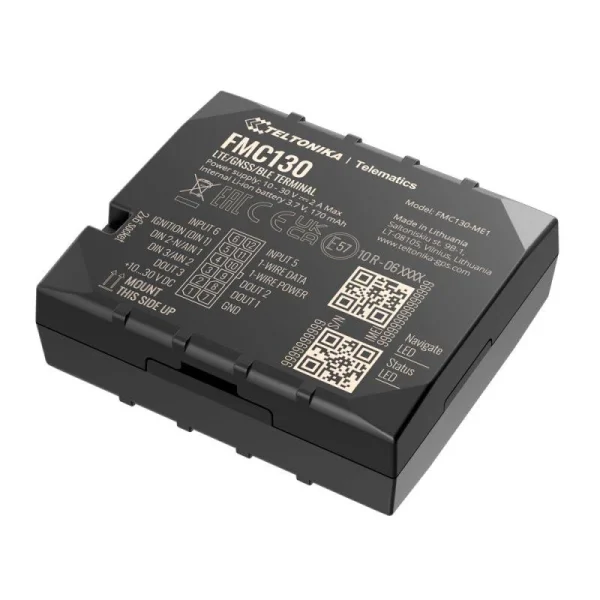
This tracker is powerful for one simple reason: it can grow with your needs. With CAN adapter support, you can read real vehicle data like fuel level, odometer, RPM, engine temperature, and more — across light vehicles, electric vehicles, trucks, buses, and even special machinery. And if you’re building a more serious security setup, it also opens the door to features like remote engine blocking (installed properly, with the right wiring and the right use-case).
Now here’s where it gets really interesting: the FMC130 becomes even stronger when you pair it with a sleeper backup like the Teltonika TAT240:
https://kiloelectronics.com/en/produkt/teltonika-tat240-battery-tracker/

This is how you use it in the real world:
You install the FMC130 as your primary tracker — the device doing the normal job: tracking, alerts, day-to-day visibility.
Then you hide the TAT240 somewhere that doesn’t get casually searched. Behind a door panel. Inside a seat. In the trunk area. Even in places people don’t think to open unless they’re doing a full teardown.
And the key detail: the TAT240 isn’t trying to be “always online.” It’s sleeping most of the time. That’s the whole point. A device that’s asleep is much harder to jam consistently, and it’s much harder to detect because it isn’t constantly shouting “I’m here.”
If your primary tracker ever gets discovered and disconnected, the TAT240 can take over and start sending its own location updates. And because it reports rarely, it becomes even harder to locate and remove. You don’t need a live breadcrumb trail every minute. You need a second chance after the car has been “cleaned.”
This is the setup most thieves hate, because it forces them to be thorough—and thorough takes time, tools, and risk.
Layer 4: The “If I Had to Pick Only One” Option (Easy Install, Hard to Find)
If you’re the kind of person who says, “I get the layered approach, but I want to start with one tracker and keep it simple,” this is the option I’d pick.
The Teltonika FMC880:
https://kiloelectronics.com/en/produkt/teltonika-fmc880-4g-tracker-en/
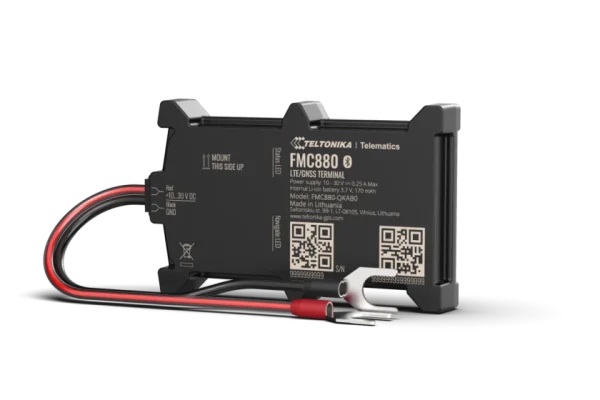
Why this one? Because it’s genuinely practical. You can install it yourself, and you can install it in a place that doesn’t scream “tracker.”
Here’s a small tip that makes a real difference: yes, the tracker can be connected at the battery, but if you want to make it harder to detect, tap into the power wires a little further away from the battery. The more “obvious” the connection looks, the easier it is for someone to follow it.
Now, just so expectations are clean: this is not the tracker you buy for rich vehicle data. It doesn’t read fuel level, RPM, or engine temperature. This is basic location monitoring.
Layer 5: Skip AirTags — Use a LoRaWAN Tracker Instead
People hide AirTags. I get why. They’re simple.
But we don’t recommend them for theft recovery for a very practical reason: they’re easy to neutralize. First, the thief gets alerted that an AirTag is nearby. Then they can turn off their phone so the tag can’t “piggyback” on it. After that, the car often gets taken to a quiet “cool-down spot” (in Russian it’s отстойник) where the vehicle is left for a while so they can check for trackers and make sure they weren’t followed.
And those places are usually not somewhere people casually walk by. So your AirTag may sit there without ever getting a chance to report its location through someone else’s iPhone.
If you want a stealthy backup that doesn’t play by those rules, use a LoRaWAN tracker instead. The LoRaWAN network isn’t everywhere, and we’re not pretending it is. But the point is that sooner or later it will report a location, and that’s often all you need to recover the vehicle.
Any LoRaWAN tracker will do. Here’s one example we stock:
https://kiloelectronics.com/en/product-category/sensors-en/trackers-en/
Connectivity, “No Subscription” Claims, and Why the Dashboard Matters More Than People Think
Before you pick a tracker, you need to understand one thing: “no subscription” trackers are basically a marketing trick.
Every GPS tracker needs connectivity. That means a SIM card and a data plan. If a tracker is advertised as “no subscription,” what it usually means is that you’re paying for connectivity upfront (or you’re expected to bring your own SIM and pay a carrier yourself). There’s no magic here—someone always pays for the data.
The second thing people don’t realize is that SIM cards are not equal.
Most SIMs are built for one country, or they look “international” until you actually need roaming in the wrong place. And this matters because a lot of stolen vehicles don’t stay local. Cars get exported. If your tracker becomes blind the moment it crosses a border, it’s not protection—it’s a false sense of security.
We use global connectivity that works across countries, and we’ve seen exactly why that matters in real life. We helped recover an EU vehicle that ended up in Africa. That kind of recovery is simply not possible with every SIM setup.
If you want the same kind of coverage, start here:
https://kiloelectronics.com/en/produkt/global-iot-sim-card-by-kilo-connectivity/
Then there’s the part nobody talks about: SIM management.
With most trackers, you’re juggling carrier logins, separate portals, and “where did I put that SIM info?” With our setup, SIM management is handled inside our platform—right in your dashboard. If you’re managing more than one tracker, that alone is worth it.
And finally: the dashboard isn’t optional.
A tracker by itself is just hardware. It has to send data somewhere—a server that is configured to receive it, store it, display it, and alert you. That’s why a lot of DIY tracker setups fail: the device is fine, but the backend is a mess.
All of the trackers we sell can be configured to forward data to any server that supports it. But the easiest path is forwarding to our platform—and if you want to make it even simpler, we can pre-configure the device for you before shipping. Just tell us what you’re trying to protect and where the tracker will be used, and we’ll set it up so it works out of the box.
Important: if you’re a business customer, use our Commercial Platform. If you’re a private customer, use our platform for private customers. (You’ll add the hyperlink yourself.)
Legal Note (Simple and Honest) for vehicle locator devices
Tracking your own vehicle is generally allowed. If other people use the vehicle (employees, family members), you should handle transparency and privacy properly. If you’re installing trackers for a business fleet, treat this as a compliance topic and do it right.
Closing Thought
You bought a car because you wanted freedom — not anxiety.
A tracker shouldn’t be something you “hope” will help one day. It should be a system you understand and trust.
If you want help choosing the right combination for your vehicle (quick install vs. hidden install vs. sleeper backup), start here and compare the options we stock:
https://kiloelectronics.com/en/product-brand/teltonika/
https://kiloelectronics.com/en/product-category/sensors-en/trackers-en/